
It has only been three months since I started using Claude Code almost each day. And token usage is the limiting factor when you invoke a team of agents or even use several Claude Code instances to build parallel features or resolve bugs.
Rust Token Killer was shared by a colleague last month and I integrated it into my workflow.
What Is Rust Token Killer, a.k.a RTK
RTK (Rust Token Killer) is a high-performance CLI proxy written in Rust that sits between AI coding agents (Claude Code, Cursor, Copilot, Gemini CLI, etc.) and the shell, reducing theoretically LLM token consumption by 60–90%. It has ~19.5k GitHub stars and is at version 0.35.0 at the time of writing this article.
It works by intercepting common developer commands (git, cargo, npm, docker, kubectl, AWS CLI, etc.) and applying four compression strategies: smart filtering (removes noise/boilerplate), grouping (aggregates similar items), truncation (keeps relevant context), and deduplication (collapses repeated lines). The overhead is under 10 ms per command.
RTK supports 10+ AI coding tools via auto-rewrite hooks that transparently (only on UNIX systems) prefix shell commands with rtk—the LLM never sees the rewrite, it just receives a compressed output.
Installation is straightforward via Homebrew, curl script, cargo, or prebuilt binaries for macOS/Linux/Windows. Setup per agent is a single rtk init command with a flag for the target tool. Or you can manually define RTK’s per agent. You’ll read about that in the next paragraph.
Key capabilities include 100+ supported commands spanning file operations, git, GitHub CLI, test runners (cargo, pytest, go, vitest, playwright, rspec), build/lint tools (tsc, eslint, clippy, ruff), package managers, AWS services, and container tooling.
A “tee” feature preserves a full unfiltered output on failures for recovery.
Finally, token savings analytics are built in via rtk gain and rtk discover.
Oh, and for the record, RTK collects anonymous, aggregate telemetry once daily (opt-out available).
See more on their GitHub repository.
Installing It in Windows 11 Home
The steps are simple:
- Download release from https://github.com/rtk-ai/rtk/releases
- Put exe into
/your/path/to/rtk/bin - Update PATH variable to add
/your/path/to/rtk/bin
Caveat With Non-Unix Environment
You can’t reach full transparent integration with Claude Code.
Note that if you have issues with subagents to run rtk [command], make sure you restarted Windows after editing your path with the absolute path RTK’s bin. You always have the option to tell Claude and the sub-agents to run RTK using the absolute install bin path. In a MINGW64 shell, it might happen.
Also, in Windows, you won’t be able to use the hook to avoid the manual prefix on every command. I actually have to add the following to CLAUDE.md to make Claude and the sub-agents would use RTK:
| |
It also means the rtk prefix is present when you see Claude run. But that’s OK.
In my agents, I make sure to provide a clear sublist of the commands the agent must use with RTK. For example, my Git agent has:
| |
The other agents are limited to file and search commands or test runners so I reminded them of those.
Gain or No Gain
On my laptop usage, I see the following gain:
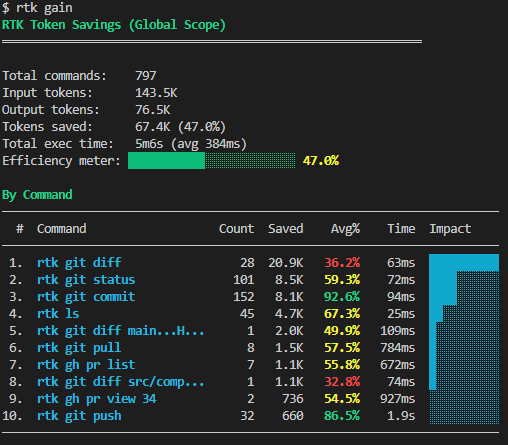
Though I’m not in the range advertised, any gain is still good, especially on git or gh CLI commands.
In reality, the biggest gain will come in the context engineering. I’ll cover my insights in a later article about this.
Future Upgrade
I’ll upgrade to Windows Pro very likely to use WSL on Windows. It isn’t possible on Windows Home.
Why would I do that? Because WSL will make it possible to run RTK commands transparently with polluting the agent’s definition.
Follow me
Thanks for reading this article. Make sure to follow me on X, subscribe to my Substack publication and bookmark my blog to read more in the future.
Photo by Alex Knight on Pexels.
